

Login and registration related
How to log in to the trading platform?
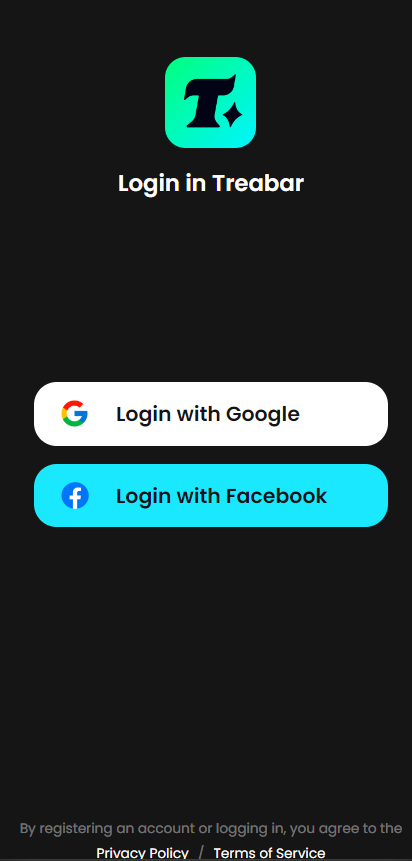
Enter the trading platform through the link treabar.com, and click the "Me" button at the lower right corner to log in.
You can log in using Google, Facebook or your account. The first login will default to registering a platform account.
Transaction-related
How to change the language and currency?
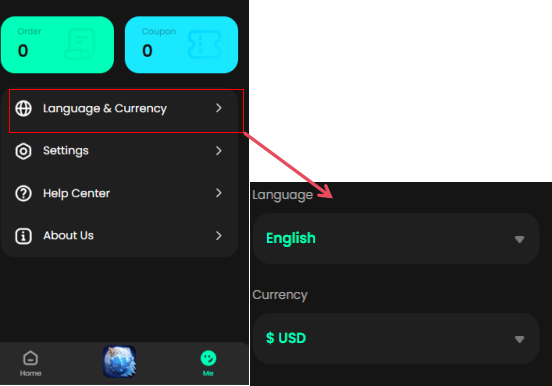
You can find the currently set language currency in the website navigation, click on it and change the Settings

You can also change the language and currency Settings in "My - Language and Currency" after logging in.
Transaction Fee Standards?
Straight imitation business charge standard: straight filling business won't be additional charges (except for the fees of paying), top-up amount of goods will be according to the game business change and the adjustment of price, please refer to the game top-up page of prepaid phone display amount to complete the payment.
How long does it take for direct game recharge to arrive?
After your successful payment, the game direct recharge will arrive within approximately 10 minutes. During peak recharge periods or special times such as system upgrades, there may be delays or no arrival at all. It is expected to arrive within 24 hours or be automatically refunded. If you have any objections to your personal order, you can click on "Contact Customer Service" for handling.
How to check the direct recharge record of the game?
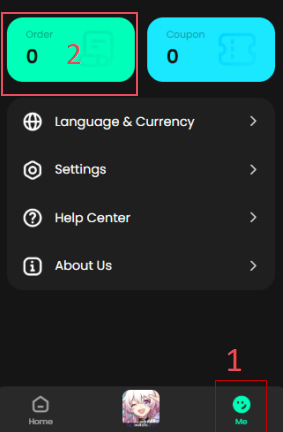
You can check the status of your personal order in "My - Orders". If the order shows success, you can log in to your personal game to check. You can check the corresponding asset increase situation in the game. Generally, the game will remind you that your recharge has been credited through pop-up Windows or in-game email reminders.
What should I do if I enter the game direct recharge information incorrectly?
Important Notice: The trading platform shall not be held responsible for any erroneous purchases made by users due to negligence, providing false or incorrect information, etc. Once an order is completed, it cannot be cancelled or returned.
Please note:
1.Please carefully check the recharge information before making the payment: game account ID, username, and server to avoid incorrect recharge issues
2. Due to the requirements of the service provider, once a recharge order is completed, it cannot be cancelled or returned. You can re-initiate the recharge, but the trading platform will not be held responsible for any incorrect purchase issues.
3. If the game id is filled in incorrectly, resulting in the inability to recharge the game, in this case, the order will be automatically refunded after confirming that the game id and other information are filled in incorrectly.
If you have any questions about your personal direct charging business orders, you can click to contact customer service for handling
How to handle the situation if the game direct recharge has not arrived?
If there is a situation where the game direct recharge has not been credited and the order has not been refunded, please provide the relevant vouchers of successful payment and uncredited payment, and click "Contact Customer Service" for handling. If the platform customer service verifies that the in-game recharge has not been credited, they will process a refund for you.
Top-up related
How to use the bank card prepaid phone?
You can use your credit card (VISA) to recharge on the trading platform. The recharge channel will charge a certain handling fee. The specific rate can be calculated after selection on the order page.
When binding, please ensure that the following information is filled in correctly:
Fill in the correct personal information, such as name, country/region, detailed address, etc. These detailed information need to match the detailed information of the card issuer or the bank on the document;
Fill in the correct card number and card verification code (CVC)
Below is through the bank card value-added note:
* single top-up top $500, up to 10 times a day, up to 50 times a month.
* an account can be bound up to five pieces of different bank CARDS, but you binding card cardholder name should always consistent.
* when your prepaid phone failure, please check the value-added page system failure reasons of feedback, and solve the problem, and then to try next time.
* There are daily, weekly and monthly limits on the number of recharges. Please ensure that your bank card has sufficient balance for recharging. In case of failure, please check the failure cause notification and solve the problem. Continuing to try to recharge without solving the problem will waste your chance.
* If you have any questions, please contact customer service for assistance.
How to recharge without a credit card?
The trading platform supports multiple transaction methods, including credit cards and e-wallet payments. You can check the currently available payment methods on the order payment page.
What are the minimum and maximum recharge amounts for a single transaction?
The minimum amount for a single recharge using a VISA card is 10 US dollars and the maximum amount for a single recharge is 5,000 US dollars.
What is the recharge rate?
Bank payment system will charge a fee, currently used VISA card prepaid phone channel rate of 4.5% + USD $0.2, is suitable for the vast majority of support VISA country, use the PayPal prepaid phone channel fee of 3.9% + USD $0.3.
Reasons for failed recharge and Solutions?
If you place your order of prepaid phone failure, please take a closer look at the cause of the failure, charge a specific errors and solutions as below.
(1)single top-up amount is too high
If you top-up order suggest "Do Not Honor", "Suspected Fraud" such as error, probably because the amount is too large top-up trigger security alarm, you can control each top-up amount under $1 00 in to try again.
(2) Other reasons for rejection by the bank
If your recharge order fails, it is very likely to be rejected by the bank rather than the trading platform. Possible reasons include:
i)You don't have enough funds in your bank account
ii)Your card is restricted from access
For detailed information on the reasons for the payment rejection, please contact the bank or credit card company directly.
The trading platform may also reject your recharge for the following reasons:
(1)You attempt to bind the same credit card to more than two different trading platform accounts
(2)You have reached our recharge limit
If the recharge fails, the trading platform will not charge any fees. You can try to recharge again in the following ways:
(1)Change the bank card
(2)Use other browsers or PCS
(3)Make small and multiple recharges
(4)Enable the blocking reminder of the browser
If you have any questions about the recharge result, you can click "Contact Customer Service" to get in touch with us.